
Accessibility you can prove. On every release, not once a year.
Guided checks for every page and screen against WCAG and EN 301 549, a ticket for every failure, a statement built from the results that updates itself when you fix something. Websites free. Apps and your own coding agent on the paid plan.
Read the transcript
An executive in a pale blue suit and pearls sits at a boardroom table holding an open report.
Executive: “What are we doing about accessibility?”
A team of consultants files in. Time passes: they type for months among piling coffee cups, then stack a tower of report binders on the table.
Narrator: Most companies bring in a consultancy, wait months, and get a long list of everything that’s wrong.
A colleague opens a laptop. Overnight the room empties and fills again, and the AUDITSU dashboard is on screen.
Narrator: Smart ones use AUDITSU. It’s done in days, and shows you who’s affected and how to fix it.
The team works around the laptop.
Narrator: And for every update after that, your own AI agent runs the checks, with every step recorded and signed off by a human.
A lawyer arrives and hands the executive a letter marked “Demand”. The colleague turns the laptop round to show the screen.
Narrator: So, when someone asks you to prove you’re accessible, you can.
End card: the AUDITSU logo, “AUDITSU lets you prove you’re accessible.”, “Your agent does the checks.” and “A person signs off every finding.”
Narrator: AUDITSU lets you prove you’re accessible. Your agent does the checks. A person signs off every finding.
On the paid plan, your own coding agent does most of the checks and a person on your team signs off every finding. Want it in your pipeline? Our engineers wire the checks into your CI so every release is tested before it ships.
Aligned with the European Accessibility Act · UK Public Sector and NHS · ADA / Section 508
Backed by



Built on Google Cloud
What happens after you click.
Built for the person who owns compliance, not the person who writes the code. Your team runs the audit, every finding and fix is recorded, and a named person signs off the result.
No scanner decides and no template guesses. Every result is made or accepted by a person, and recorded against their name.
Add your website
Create an account with an email address or Google. No card. Name your website and the first page you want to audit. The free plan covers one website.
Answer one check at a time
Each screen is one plain-language question with why it matters and how to test it. You answer Pass, Fail or N/A. Checks that do not apply to your product are filtered out before you start, and the walkthrough estimates the time left as you go.
Every Fail becomes a ticket
A Fail asks for a description and creates a ticket on the spot, so the fix is written down and assignable before you move to the next check.
Publish a statement built from the results
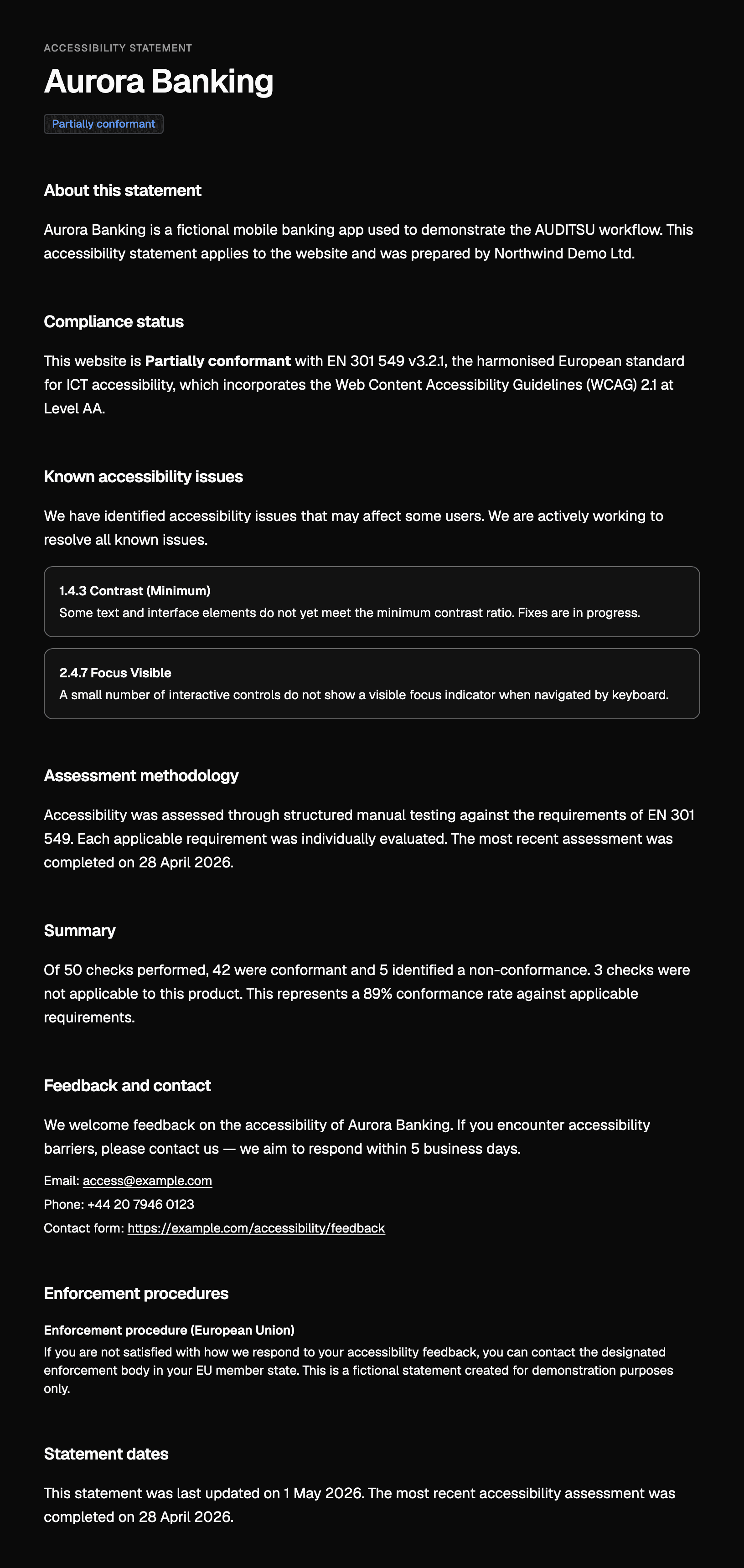
Your accessibility statement is drafted from your verdicts, not a template, and a person on your team publishes it. Resolve a ticket and the statement reflects it.
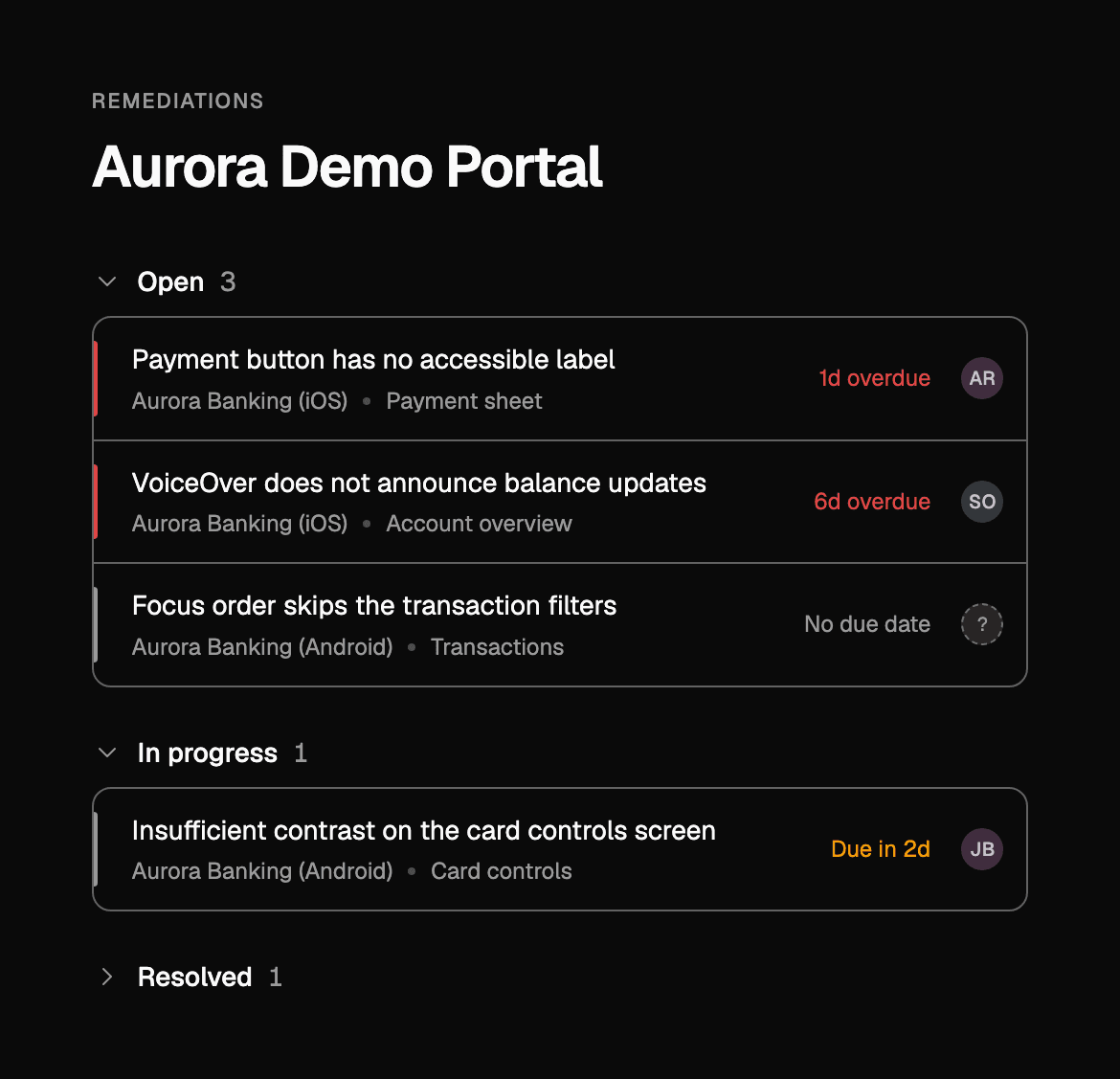
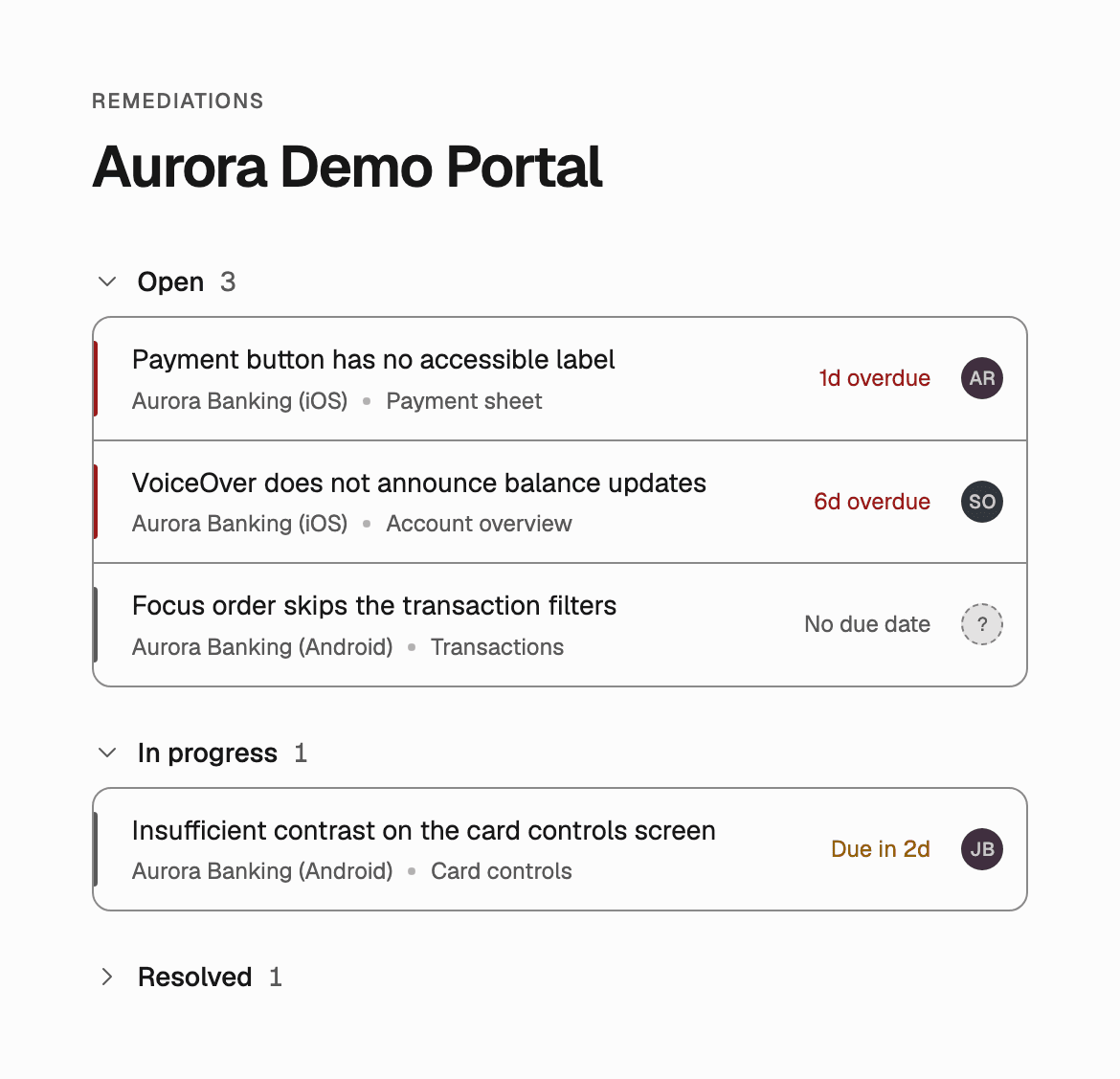
Every failed check becomes a ticket.
AUDITSU turns your audit into tracked remediation work, assigned and prioritised, so fixing accessibility feels like normal engineering instead of a once-a-year fire drill.
Not a consultant. Not a widget.
There are two ways teams usually “do” accessibility, and neither one sticks. AUDITSU is the third way: your team runs it, and the evidence stays current.
The consultancy
A specialist audits your site once and hands you a £15,000 PDF. It's accurate the day you get it, and out of date the moment you ship the next release.
The widget
A bolt-on overlay promises instant compliance. It never fixes your real code, can't touch native apps, and regulators don't accept it as evidence.
AUDITSU
Your team runs guided audits, fixes the real issues, and publishes an accessibility statement that updates as you go. Living evidence you own, for your website and your apps.
Do it yourself free, or have your agent do the legwork.
On the free plan your team audits one website. The paid plan adds your iOS and Android apps, and your own coding agent does most of the checking while a person on your team signs off every finding.
Website auditing
£0 / month. No card.
- One website
- Your team answers a guided walkthrough, one check at a time
- Every Fail becomes a ticket
- An accessibility statement built from the results
Websites, mobile apps and your coding agent
In beta. No published price: it is agreed on a call.
Everything in Free, plus:
- Your iOS and Android apps
- Your own coding agent, for example Claude Code or Codex, does most of the checking
- A named person on your team reviews every finding
- A sealed, timestamped record
Book a call to talk through the paid plan, or start free with your website today.
Your agent does the checks. A person signs off every finding.
On the free plan your team answers every check. On the paid plan your own coding agent does most of the checking, and a named person on your team reviews every finding before it reaches your record.
We connect your agent, with you
We connect your own coding agent, for example Claude Code or Codex, to your AUDITSU account with you on a call.
It proposes a result for every check
Your agent works through the audit and proposes a result for every check it is allowed to take.
Your reviewer signs off every finding
A named person on your team confirms, rejects or overturns each proposal. Nothing counts until a person accepts it.
Why you can trust what your agent proposes.
The fair question is whether an agent's answers can be relied on. They are never relied on alone. A person stays accountable for every result, and the record shows it.
Your agent can only propose
It never decides a result. Every result on your record was accepted by a person.
You set the rules before it runs
The rules your agent works under are agreed before it starts, and a named person on your team signs them.
A person always spot-checks its work
A random share of your agent’s proposals is always checked by a person.
Judgement calls stay with people
Checks that need human judgement are always left to a person on your team.
The record says who signed off
Every accepted result records who signed it off and under which rules, and your public statement says how many results were accepted that way.
A live accessibility statement, built from real audit data.
Fix an issue and your public statement updates itself. No templates, no guesswork, no document that goes stale the moment you ship the next release.
Our first customer's public-sector buyer required accessibility evidence. They produced it with AUDITSU, and the buyer accepted it.
Three people have to agree. This is what each of them sees.
For the person who owns compliance
Accessibility landed on your desk next to GDPR, and unlike those it cannot be run from a policy document. Someone has to test the product. This turns that into a guided walkthrough your own team answers, with every verdict recorded against the person who made it.
For the person who approves the spend
When the board, a regulator or a large customer asks whether you meet the standard, the answer should not be a consultant’s PDF from last year. You get your current position, who is working on what, and a published statement built from the audit. No agency retainer, no code access, nothing installed on your product.
For the engineers
Engineers do not want an audit; they want to know what failed, where, and how severe it is. Failed checks arrive as tickets with the screen, the standard and the severity already filled in. Nothing is scanned, injected or overlaid.
Accessibility is good business.
Compliance is the floor, not the point. Getting this right grows your audience, sharpens your product, and lowers your risk, in that order.
Reach everyone
Around 1 in 5 people live with a disability. An inaccessible site quietly turns paying customers away at the door.
Better for everyone
Accessible sites are simply better sites: cleaner structure, stronger SEO, faster pages, and clearer journeys for every visitor.
Ahead of the law
And yes, you stay ahead of the EAA, the UK Equality Act, and the ADA. Without the last-minute panic.
Why Mobile is Different
Auditing your website is the free, guided starting point. But apps are more than websites on a small screen. They are complex environments with platform behaviours that web-only checks can't reach.
That is where AUDITSU goes further. Mobile app auditing on the paid plan gives you the clarity to meet the standard on native apps quickly, so you can focus on serving your customers and growing your business.
Key Regulations
European Accessibility Act (EAA)
EU-wide law in force since June 2025, covering websites and apps that serve EU consumers.
Americans with Disabilities Act (ADA)
US law prohibiting discrimination, with Title III applying to websites and digital services.
Section 508
US federal requirement for accessible electronic and information technology.
WCAG 2.1
International guidelines for web content accessibility (Level A, AA, AAA).
EN 301 549
European standard for accessibility requirements for ICT products and services.
UK Accessibility Regulations
Public sector bodies accessibility requirements and private sector guidelines.
Partly accessible was not enough for the court.
In June 2026 a French court ordered Carrefour to make its website and app fully accessible. Meeting 71% of France's national accessibility standard was not enough.
Tribunal judiciaire de Caen, 4 June 2026. Read our summary of the Carrefour ruling
Everything under accessibility.
Website audit
The free tier, the checks it covers, and the checks in your pipeline on every release.
See the website auditApp audit
iOS and Android against EN 301 549, screen by screen, including Chapter 11.
See the app auditAccessibility statement
Built from your audit results, and it updates itself when your results change.
See the statementManaged audit and user testing
We run your first audit from £1,500, and test with people who use assistive technology every day.
See the managed auditAccessible website build
Your first site or a replacement, built to standard and audited before handover.
See the website buildPricing
What is free, what is on the paid plan, and what the managed audit costs.
See pricing
Frequently Asked Questions
Is this a scanner, or do I do the work?
Is this a scanner, or do I do the work?
On the free plan you do the work, with guidance. Each check is a plain-language question with why it matters and how to test it, and you answer Pass, Fail or N/A. On the paid plan your own coding agent does most of the checking, but it can only propose a result: a person on your team accepts, rejects or overturns every one. AUDITSU is not a scanner, nothing in it decides a result on its own, and every result is recorded against the person who made or accepted it.
What do I see in the first ten minutes?
What do I see in the first ten minutes?
Create an account with an email address or Google, verify your email, name your website and its first page, and you are on the first check. Your first Fail creates your first ticket. No card is asked for at any point on the free plan.
How long does an audit take?
How long does an audit take?
A typical website audit takes one to three days of one person's time, spread over as many sessions as you like. It depends on how many pages you audit and how many checks apply to them: checks that do not apply to your product are filtered out before you start, and the walkthrough shows a time estimate for what is left as you answer. Verdicts save as you go, so you can stop and pick up where you left off.
Do you need access to my code or my app?
Do you need access to my code or my app?
No. You audit the product as your users meet it: the live website in a browser, or the app on a phone. Nothing is installed on your site and no code access is required.
Do I need a developer?
Do I need a developer?
Not to audit. Fixing a ticket usually does, so tickets are written to hand to whoever builds the product: what failed, on which page, and what the standard requires.
Is the free plan really free, and does it expire?
Is the free plan really free, and does it expire?
Yes, and no expiry. The free plan covers one website with the full walkthrough, tickets and the accessibility statement. Mobile app auditing, up to five websites or apps, guest seats, evidence packs and the timestamped audit trail are on the paid plan.
Which version of WCAG does it audit against?
Which version of WCAG does it audit against?
You choose the jurisdictions your product needs to meet when you create an audit, and AUDITSU tailors the checks to WCAG 2.1 AA, WCAG 2.2 AA or EN 301 549 v3.2.1 accordingly. For EU products that is EN 301 549, which incorporates WCAG 2.1 AA and adds mobile-specific requirements.
Can I see it before I sign up?
Can I see it before I sign up?
The accessibility statement for this website is published by AUDITSU from our own audit, and the product pages show the ticket and statement views. The walkthrough itself sits behind sign-up, which takes a minute and needs no card.
Does the European Accessibility Act apply to my website or app?
Does the European Accessibility Act apply to my website or app?
If your company provides e-commerce, banking, transport, telecoms, streaming, or e-book services to EU consumers, yes. The EAA has been enforced since June 2025 and covers both websites and mobile apps as the delivery mechanism for regulated services. It applies regardless of where your company is based.
What standard does my website or app need to meet?
What standard does my website or app need to meet?
EN 301 549 v3.2.1, the European harmonised standard for ICT accessibility. Websites are assessed against WCAG 2.1 AA. Mobile apps go further: Chapter 11 adds requirements beyond WCAG, including VoiceOver and TalkBack compatibility, platform accessibility services, and OS preference inheritance.
Do I need accessibility expertise to use AUDITSU?
Do I need accessibility expertise to use AUDITSU?
No. Every check explains what to verify and why it matters, so newcomers can audit with confidence while experienced auditors move quickly. Failed items become tracked tickets assigned to your team, and your accessibility statement is generated from real audit results.
Your website and app need an audit trail, not just a statement.
Know where you stand against the EAA. Audit your website free. The paid plan adds your iOS and Android apps, and your own coding agent runs most of the audit while a named reviewer signs it. In beta. Book a call if you're interested.